
HBS IT is excited to launch a new monthly newsletter dedicated to all things AI at HBS and Harvard. The newsletter will feature important tool updates, responsible use highlights and reminders, upcoming training and learning opportunities, and feature the creative and cool ways your colleagues across HBS are using AI to enhance their work.
This Month's Feature — Know Before You AI
As more and more of us expand our use of AI, please take some time to familiarize yourself with the AI Responsible Use Guidelines to ensure you are using both HBS/HU tools as well as public tools in the right way.
You should only use public tools for level 1 data. HBS/HU provided tools are approved for use with level 3 data
Level 4 data should NOT be input into any AI tools
For reference you can find the data level classifications on the HUIT InfoSec pages
AI News: Copilot Chat will become Copilot Chat (Basic)
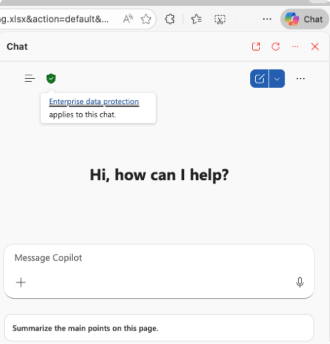
Copilot Chat, the free version of Copilot will still be available in Outlook but is leaving Excel, Word, and PowerPoint began on April 15, 2026.
Key Points
Copilot will no longer be available in Word, Excel, PowerPoint, and OneNote.
Users still get Copilot in Outlook with inbox and calendar grounding. New in-product labels will appear, and Copilot Chat will become “Copilot Chat (Basic)”
Copilot Chat is always directly available on the web at https://m365.cloud.microsoft/chat/
Try This
You can use Copilot Chat with Word, Excel and PowerPoint for the web by opening the file in the Edge Browser.
The Copilot sidecar is always there and will contain prompts related to the open page.
Using AI at Harvard
HBS and Harvard are happy to share a number of resources to help inspire your AI experimentation and innovation.
Harvard University offers a number of administrative, teaching, learning and research resources, and of course the AI Sandbox for faculty, staff, and doctoral students with powerful tools to help you bring your ideas to life.
In the coming issues of this AI focused newsletter, we will begin to showcase specific use cases being applied across HBS. You can sample a few of these now on the AI Academy website (login required). If you would like to have your work featured in an issue, please contact Shannon Breen (sbreen@hbs.edu).
AI Use Case Spotlight: Using ChatGPT to Streamline Qualitative Data Analysis
The Problem: Analyzing qualitative data like interview debriefs is time-intensive and repetitive. Teams must sift through long, unstructured responses to identify patterns and insights, and revisiting past work requires re-familiarizing with large volumes of content.
The AI Solution: Building a custom GPT trained on interview data, internal terminology, and defined insight frameworks. It can quickly summarize materials, surface key themes, and generate structured outputs aligned with how the team analyzes qualitative feedback.
Time Saved/Impact: The tool reduces time spent reviewing and synthesizing interview data while improving consistency across projects. Because it’s shared across the team and built on the same context, it ensures everyone is working from a consistent foundation. It also makes insights easier to revisit and reuse, turning previously manual analysis into a faster, more scalable process.
What it looks like in practice: Team members use guided prompts to extract insights, themes, or quotes. The GPT synthesizes findings within and across projects, delivering clear, structured outputs that support decision-making.
Could this work for your team? If your team works with qualitative data or regularly synthesizes insights from unstructured inputs, a custom GPT can help streamline analysis and make findings more accessible.